


Antistress Relax Fidget Games
4.41.19K Reviews
App Specs
- Version
- 1.9.5
- Updated On
- License
- Free
- Downloads
- 10,000,000+
- Developer
- DobroApps
- Categories
- Entertainment
- Platform
- Android
Screenshots


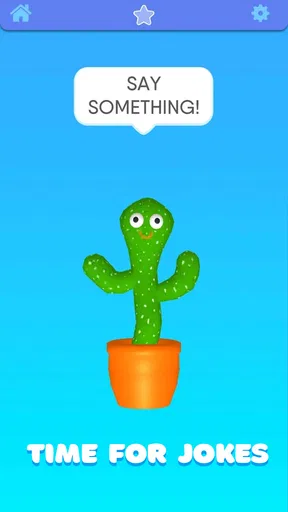


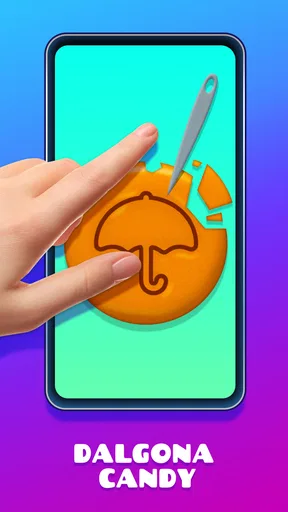

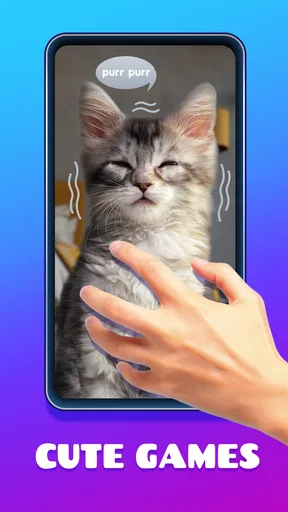
 Analysis by AppCompare
When I reach for a quick distraction, I want something I can understand immediately—not another routine to set up or a screen full of decisions. Antistress Relax Fidget Games is a collection of small, tactile-style activities for that sort of pause. I find it most useful as a brief change of focus, rather than as a serious tool for treating stress or improving sleep.
Where people can get stuck
The appeal is also the main trade-off: these are simple activities, so someone expecting guided breathing, structured mindfulness lessons, or a long-term wellness plan may feel the app is too light. Its entertainment focus is clear once you start tapping around, but it helps to set expectations before downloading. I’d approach it as a handful of screen-based distractions, not as a substitute for professional support or a way to solve the source of ongoing anxiety.
It can also take a moment to find the activity that suits your mood. A repetitive action may feel calming to one person and irritating to another, while a sound that makes an activity satisfying for me could be unwelcome in a quiet room. I’d start with a short session and adjust the device’s sound in the usual way if needed. That simple check is more useful than forcing myself to keep playing a mini-game that doesn’t feel relaxing.
Setup checks before a first session
This is a free entertainment app from DobroApps, with optional in-app purchases priced from $2.99 to $3.99 per item. It is rated for Everyone, and its current version is 1.9.2. The app first appeared on February 21, 2020, and requires Android 7.0 or later. Its reach is substantial—over 10 million installs—and its average rating is 4.3 from around 50,000 ratings, with roughly 1,200 written reviews. Those figures give a sense of its audience, but they don’t guarantee that every activity will suit your preferences.
Before opening it, I’d check the basics that commonly affect any mobile app: confirm there is enough free space for installation, use a stable connection while downloading, and make sure the device meets the stated Android requirement if you’re on Android. If the store page offers it for your device, install through the official app store rather than an unfamiliar download source. On iOS, use the official store’s compatibility information for your device rather than assuming Android’s minimum applies there.
If an activity appears unresponsive, I’d first give the screen a clean tap or swipe and check that the app is in the foreground. Then I’d close and reopen it, and restart the device if the problem continues. These are general troubleshooting steps, not a claim that this app has a particular known fault. If installation itself fails, checking the connection and available storage is a sensible first move; repeated attempts without checking either can waste time.
Making the short-session format work
I find short-session apps work best when I decide what I want from the pause before opening one: a repetitive motion, a simple visual to follow, or a small creative distraction. That keeps browsing from becoming the break itself and makes it easier to notice whether an activity is actually helping. From there, it’s worth looking at how to return to a useful routine when a session is interrupted or stops feeling relaxing.
Worth Reading Before You Choose

EA SPORTS FC Mobile 26 Is a Bigger Football Game, but It Takes Time

Flipboard Shows What News Apps Must Do Beyond the Feed

Switching to Android Auto Means Rethinking Your Driving Routine

Google Calendar Makes a Crowded Week Easier to Manage

Ludo King Makes the Most of the Minutes Between Plans

Baby Panda World Brings Quick Play to Modern Phones, but Its Game Library Feels Busy
A World of Relaxation at Your Fingertips
The app offers a variety of fidget games designed to help you unwind. From popping bubble wrap to playing with a virtual Newton's cradle, there's something for everyone. Each game comes with soothing sounds that enhance the relaxation experience. Honestly, who knew popping virtual bubbles could be so satisfying?
One standout feature is the sand drawing game. It's incredibly therapeutic, allowing you to drag your finger across the screen and create intricate patterns in the virtual sand. The sound of the sand is spot-on and adds to the immersive experience. It’s like having a mini Zen garden in your pocket.
Small ways to choose an activity
With a collection of brief interactions, I find it helpful to pick based on what my hands and attention need rather than browse indefinitely. If I want a simple, repetitive action, bubble popping is an obvious starting point; if I’d rather make something without aiming for a result, the sand activity gives me room to trace patterns. A virtual Newton’s cradle offers a different kind of visual movement. These are not interchangeable sensations, and trying one for a minute is a better test than assuming the whole collection will feel the same.
A practical use is a short reset between tasks: I might put the phone down after one activity, take a breath, and return to work instead of letting a quick break turn into an open-ended scroll. Another is keeping the app in mind for low-stakes waiting—such as sitting before an appointment—when I want an activity that does not require a story, a score, or a plan. I would avoid using it while walking, crossing streets, or doing anything that needs attention; the fact that an activity is simple does not make phone use safe in every setting.
For a quiet place, I’d consider whether sound is appropriate before starting. Even pleasant effects can be distracting to people nearby, so muting the phone or using headphones where suitable is a considerate choice. Conversely, if sound is part of what makes an activity satisfying, turning it off may remove some of its appeal. That is a small but real trade-off, especially if you expect to use the app in shared spaces.
Why Antistress Relax Fidget Games Stands Out
Now, you might be wondering why you'd choose this app over countless other relaxation apps. Well, the Antistress Relax Fidget Games app excels in its simplicity and variety. It doesn’t try to do too much, and that’s precisely what makes it effective. With over 50 mini-games, it keeps things fresh, so you’re not stuck doing the same activity over and over.
Another thing I love is that it’s perfect for quick breaks. Whether you're on a short coffee break or have a few minutes before a meeting, you can dive into a game, relax, and then return to your day feeling refreshed.
How it compares with other ways to unwind
Compared with meditation apps, this one asks less of you: there is no need to follow a lesson or keep your eyes closed. That makes it easier when I have only a spare minute or don’t want spoken guidance. The other side is that it does not offer the same kind of structured breathing or reflective practice, so I’d choose a mindfulness app instead when I want a guided session or a habit-building routine.
Compared with a physical fidget toy, the app gives me several screen-based interactions in one place, but it cannot reproduce the feel of a real object in my hand. Someone who finds touch and texture central to settling down may prefer a physical spinner, putty, or another quiet desk object. And compared with a general mobile game, the emphasis here is on small, low-pressure actions rather than a deep challenge. If I’m looking for strategic play, progression, or a longer narrative, I’d choose a conventional game instead.
The free price makes it easy to try, but I would treat optional purchases as a decision to make only after using the activities already available. The presence of in-app purchases does not mean you need to buy anything to decide whether the basic idea works for you. I’d also check the purchase screen carefully before confirming anything, particularly if a child uses the device. The Everyone age rating is useful context, but it is still sensible for a parent or guardian to manage purchases through the device’s normal controls.
When the app may not be the cause
If the app feels slow, drains your attention, or fails to make a break feel restorative, the phone or the situation may be part of the problem rather than the activity alone. A crowded room, a noisy moment, a low battery, or trying to relax while keeping one eye on urgent notifications can defeat the point of a short pause. I’d try again when I can give the screen a little attention, silence interruptions if appropriate, and stop after a brief session. If the same issue affects several apps, basic device troubleshooting is more sensible than assuming this particular app is responsible.
Likewise, if I notice that I’m opening it automatically and staying on my phone longer than intended, I’d set a personal stopping point before I begin. The app is best used as a deliberate, small diversion, not as a reason to postpone a task or avoid dealing with a difficult situation. If stress is persistent or interfering with daily life, an entertainment app is not the right level of support; talking with a qualified professional or someone you trust is a more appropriate next step.
Design and User Experience
The design is minimalistic yet effective. It’s not flashy, but it doesn’t need to be. The focus is on relaxation, and the app delivers. The color palette is soothing, with soft pastels that are easy on the eyes. Navigation is intuitive, so you won’t find yourself fumbling to find a game or feature.
What’s more, the app performs smoothly without any noticeable lag. Even on older devices, it runs like a dream, ensuring a seamless user experience. The developers have clearly put a lot of thought into the overall design and functionality.
Getting back to a useful routine
If I leave an activity because it stops feeling pleasant, I don’t treat that as a failure or keep repeating it in search of the right mood. I switch to a different kind of interaction, take a screen-free pause, or close the app. That simple choice keeps the experience low-pressure. If the app has been interrupted, reopening it and choosing an activity again is a reasonable recovery path; I would not assume that a session or personal progress needs to be restored, because the value here is the moment itself.
For someone deciding whether to install it, the practical question is whether a small sensory distraction sounds appealing. The app is a better fit for a person who enjoys tapping, dragging, and watching simple on-screen interactions than for someone who wants coaching, detailed tracking, or a tactile object. It is also a reasonable option to try during a short break, provided phone use itself is not what the person is trying to reduce.
Final Thoughts
If you're searching for a way to unwind and de-stress in today's fast-paced world, Antistress Relax Fidget Games is worth checking out. It offers a delightful escape with its variety of fidget activities and soothing sounds. Whether you're waiting for your coffee to brew or just need a moment to yourself, this app is like a little pocket-sized spa day.
So go ahead, give it a try. Your mind will thank you. And remember, sometimes the simplest things bring the most joy.
My recommendation comes with a modest expectation: use it for a quick change of focus, not as a cure-all. If the small activities suit you, the variety gives you several different ways to spend a spare moment; if they don’t, there is little reason to push through. I’d try a couple of interactions, keep the ones that genuinely feel pleasant, and move on to a screen-free break or another kind of support when that fits better.
Pros
- Wide variety of relaxing games.
- Simple
- intuitive interface.
- No internet connection needed.
- Regular updates with new games.
- Helps reduce stress effectively.
Cons
- Contains in-app ads.
- Limited free content.
- Some games are repetitive.
- Sound effects can be distracting.
- No multiplayer options.
FAQs for Antistress Relax Fidget Games
What is Antistress Relax Fidget Games and how does it work?
Antistress Relax Fidget Games is an app designed to help users relax and reduce stress through interactive mini-games. It features a variety of fidget activities, such as popping bubbles, spinning wheels, and more. The goal is to provide a calming experience, helping users unwind and take a mental break.
Is Antistress Relax Fidget Games suitable for all age groups?
Yes, Antistress Relax Fidget Games is designed to be family-friendly and suitable for all age groups. The app features simple, intuitive games that are easy to understand and play, making it an ideal option for both children and adults seeking stress relief.
Does the app require an internet connection to function?
No, Antistress Relax Fidget Games does not require an internet connection to function. Once downloaded, you can enjoy the various fidget activities offline, making it a convenient option for relaxation on the go or in areas with limited connectivity.
Are there any in-app purchases or ads in Antistress Relax Fidget Games?
The app is free to download, but it may contain in-app purchases and ads. These elements allow users to access additional features or remove advertisements. However, the core functionalities of the app remain accessible without any purchases, ensuring a satisfying free experience.
How does Antistress Relax Fidget Games help with stress relief?
The app offers a variety of simple, engaging activities that help divert your mind and provide a sense of satisfaction. By focusing on these repetitive tasks, users can experience a reduction in anxiety and stress. The soothing graphics and sounds further enhance the calming effect.


